Intro
People sometimes end a livestream and think, “Well… what do I do now?” Sometimes they get bored of being alone. In most cases, we get a good response when we go live, and sometimes we get a good response—but the next time the recording is just that.. No reuse, no extra value.
Most people do the same thing. A full hour of content, and I’d maybe share the replay once. That’s it.
But the moment I started cutting those livestreams into short video ads, things changed. Not overnight, but noticeably. In today's world, the pressure to reach more people, get more clicks, and constantly create new content is making the entire process much easier than ever with the help of AI tools.
Livestreams Are Messy… and That’s Actually a Good Thing
Here’s the thing—livestreams aren’t perfect. You pause, you repeat yourself, sometimes you go off-topic.
But inside all that, some moments feel real.
A quick explanation that just clicks. A reaction that isn’t scripted. A part where you’re actually being yourself.
The All-in-One Platform for Effective SEO
Behind every successful business is a strong SEO campaign. But with countless optimization tools and techniques out there to choose from, it can be hard to know where to start. Well, fear no more, cause I've got just the thing to help. Presenting the Ranktracker all-in-one platform for effective SEO
We have finally opened registration to Ranktracker absolutely free!
Create a free accountOr Sign in using your credentials
Those are the pieces that work really well as ads.
People scroll past polished content all the time. But something that feels real? That gets attention.
Step 1: Don’t Rewatch Everything (You’ll Waste Time)
If your livestream is long, don’t sit there trying to watch the whole thing again. That’s the fastest way to get stuck.
Instead, skim through it and look for:
- Parts where your tone changes
- Moments where you explain something clearly
- Any section that could stand on its own
Usually, you’ll feel when something is usable.
From my experience, even a random livestream can give you at least 5–10 decent clips without trying too hard.
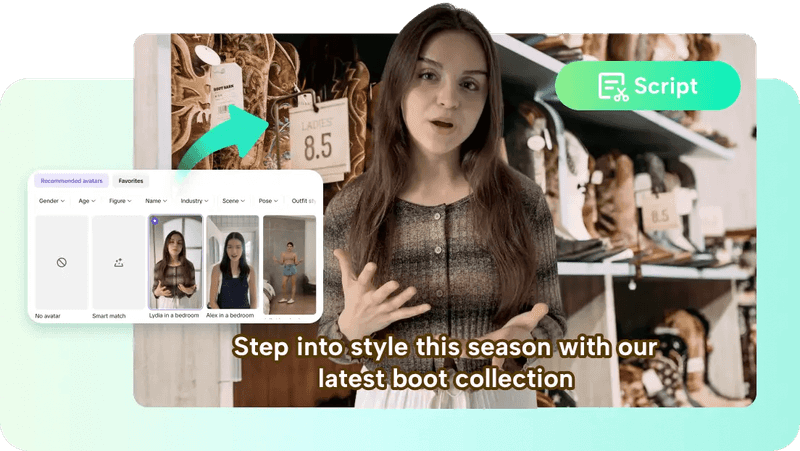
Tools like Pippit help here—they automatically highlight sections. It’s not magic, but it cuts down the time a lot.
Step 2: Keep the Edits Simple (Seriously)
This is where most people mess up.
They try to make it look like a full production—by adding too many cuts, effects, and transitions.
The All-in-One Platform for Effective SEO
Behind every successful business is a strong SEO campaign. But with countless optimization tools and techniques out there to choose from, it can be hard to know where to start. Well, fear no more, cause I've got just the thing to help. Presenting the Ranktracker all-in-one platform for effective SEO
We have finally opened registration to Ranktracker absolutely free!
Create a free accountOr Sign in using your credentials
You don’t need that.
A basic structure works best:
- A strong first few seconds
- One clear idea
- A natural ending
That’s it.
When I started using Pippit, I noticed something interesting—the less I over-edited, the better the videos performed. Just trimming out the boring parts was enough.
Step 3: Add What Actually Helps (Not Just What Looks Cool)
There are only a few things that really matter here.
Subtitles
This one is non-negotiable now. Most people aren’t watching with sound.
AI-generated captions save time, and you don’t have to type everything manually.
Light Touches
You can add a bit of style—maybe some text, maybe a small transition—but don’t overdo it.
Music (Optional)
Sometimes it helps, sometimes it doesn’t. Depends on the clip.
From using Pippit, I found that keeping things clean works better than trying to make it “fancy.”
Step 4: Resize It Once, Use It Everywhere
Different platforms need different formats. That part used to be annoying.
Now it’s mostly automatic.
You can take one clip and turn it into:
- Vertical video for TikTok or Reels
- Square for feeds
- Horizontal if needed
The useful part is that AI tools keep the focus on you (or the subject), even after resizing.
That saves a lot of manual work.
Step 5: Don’t Skip the CTA (Even a Simple One Works)
A lot of people forget this.
After someone watches your video… what next?
You don’t need anything complicated.
Something like:
- “Check it out.”
- “See how it works.”
- “Try it yourself.”
That’s enough.
Just don’t leave the video hanging with no direction.
Step 6: Actually Use the Content (Not Just Store It)
This sounds obvious, but it’s where people stop.
Once your clips are ready:
- Post them on social platforms
- Use them in ads
- Add them to your website
Since Pippit works on web, PC, and mobile, you’re not stuck editing in one place. You can upload, edit, and export from pretty much anywhere.
Why This Is Way Easier with AI
Before using AI tools, I avoided this whole process.
Too much editing. Too much time.
Now it’s different.
You upload a livestream, and instead of starting from zero, you already have:
- Suggested highlights
- Quick editing options
- Automatic captions
- Easy formatting
If you want to try it without overcomplicating things, you can check this free AI video generator.
The All-in-One Platform for Effective SEO
Behind every successful business is a strong SEO campaign. But with countless optimization tools and techniques out there to choose from, it can be hard to know where to start. Well, fear no more, cause I've got just the thing to help. Presenting the Ranktracker all-in-one platform for effective SEO
We have finally opened registration to Ranktracker absolutely free!
Create a free accountOr Sign in using your credentials
And if you want something that gives a bit more control while still saving time, this AI video generator does the job without making things complicated.
What This Looks Like in Real Life
Here’s what I usually do now:
- Finish a livestream
- Upload it
- Pick a few good moments
- Trim them quickly
- Add captions
- Export different versions
- Post them
That’s it.
No long editing sessions. No overthinking.
Final Thought
You don’t need more content—you probably already have enough.
If you’re doing livestreams, the value is already there. You just need to reuse it properly.
It is possible to create more new things with very little effort just by using these tools. This is the main goal of those who create content.