Intro
AI writing tools are everywhere now, but most buyers still start with the wrong question.
They ask, “Which AI writer is the smartest?” when the more useful question is, “Which tool actually fits the way I create content?”
That difference matters because many AI writing tools are built on top of similar large language models. What separates them is not always raw output quality. More often, it is workflow, research support, brand controls, collaboration, editing depth, publishing integrations, SEO features, or how well the tool fits a specific type of work.
That is why a free tool can outperform a more expensive platform for a solo blogger, while a premium platform can still be worth every penny for a content team publishing at scale.
For SEO teams, the gap becomes even more obvious. A tool that can generate readable paragraphs is not necessarily the one that helps you build better briefs, match search intent, cover entities naturally, improve content structure, refresh older pages, and create content that has a realistic chance of ranking.
That is also why the market has changed so much. In 2026, it is no longer enough for a tool to simply write. The best platforms now support different parts of the content workflow, from ideation and outlining to optimization, governance, publishing, and even visibility in AI-generated search experiences.
The All-in-One Platform for Effective SEO
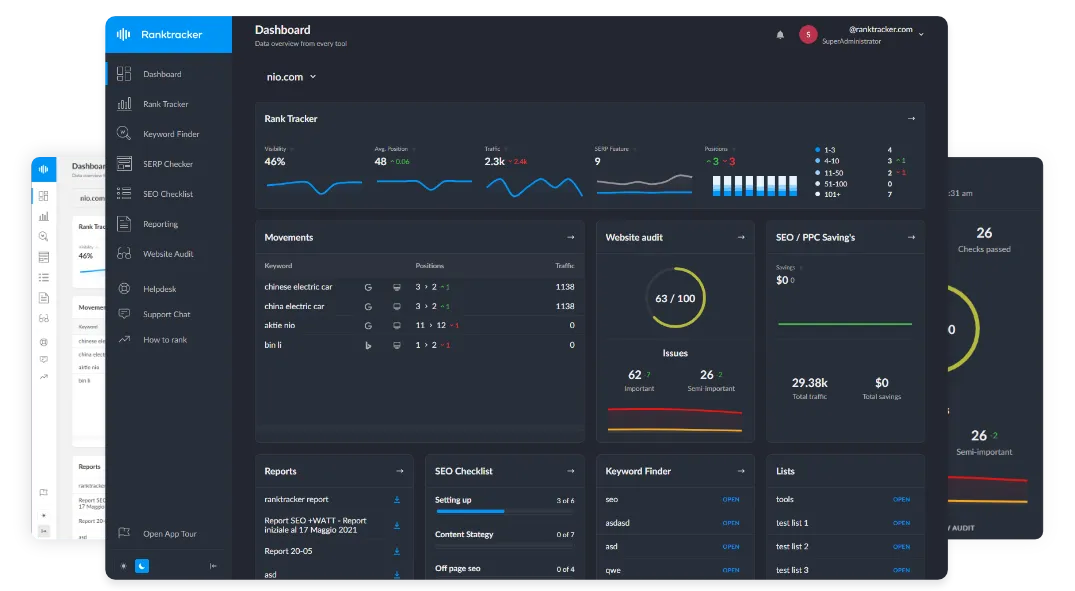
Behind every successful business is a strong SEO campaign. But with countless optimization tools and techniques out there to choose from, it can be hard to know where to start. Well, fear no more, cause I've got just the thing to help. Presenting the Ranktracker all-in-one platform for effective SEO
We have finally opened registration to Ranktracker absolutely free!
Create a free accountOr Sign in using your credentials
This guide breaks down the best AI writing tools in 2026 by actual use case, not hype.
We cover the platforms that are best for long-form writing, SEO content, marketing teams, product descriptions, editing, fiction, research, and budget-conscious users. We also explain when free tools are enough, when paid software makes sense, and how to choose a stack that supports your content strategy instead of adding unnecessary complexity.
What makes an AI writing tool worth using?
A strong AI writing tool does more than generate paragraphs on command.
The best tools help you move from idea to publishable content with less friction. That can mean faster outlining, better rewriting, stronger tone control, cleaner editing, easier collaboration, tighter optimization workflows, or better support for organic search and AI-assisted discovery.
For this list, the most important criteria are practical rather than theoretical.
First, output quality still matters. The tool should produce readable, coherent drafts that do not feel clumsy, repetitive, or overstuffed.
Second, it should fit a real workflow. A good interface, strong prompting controls, useful integrations, and support for how teams actually create content often matter more than flashy marketing claims.
The All-in-One Platform for Effective SEO
Behind every successful business is a strong SEO campaign. But with countless optimization tools and techniques out there to choose from, it can be hard to know where to start. Well, fear no more, cause I've got just the thing to help. Presenting the Ranktracker all-in-one platform for effective SEO
We have finally opened registration to Ranktracker absolutely free!
Create a free accountOr Sign in using your credentials
Third, the tool should solve a clear problem. Some tools are best for fast ideation. Some are better for SEO-led content production. Some are designed for editing and cleanup. Others are built for ecommerce, fiction, or team-wide governance.
Pricing matters too. Many businesses overspend on AI software that duplicates tools they already have. In many cases, ChatGPT or Claude can handle drafting and ideation, while a second tool is only needed for optimization, quality control, publishing, or AI-search visibility.
That is why this list includes both free-first tools and premium platforms.
The best AI writing tools in 2026 at a glance
Before getting into the full breakdown, here is the short version.
ChatGPT remains one of the best all-round AI writing tools for brainstorming, outlining, drafting, rewriting, and research-assisted content creation.
Creaitor.ai stands out because it adds built-in Generative Engine Optimization, giving teams a way to improve not just traditional search visibility, but also how they appear in AI-generated answers across platforms like ChatGPT, Claude, Perplexity, and Google’s AI Overviews.
Claude remains one of the strongest options for natural-sounding long-form writing, editorial support, and structured thinking.
Surfer is one of the best choices for SEO-focused teams that want AI assistance connected to briefs, optimization, and measurable content workflows.
Frase is a strong option for marketers who want a tighter mix of research, writing, optimization, and discoverability support.
Clearscope is better thought of as a premium content optimization and search discoverability platform than a pure writing tool, but it remains excellent for serious content teams.
Jasper is best suited to brand-conscious marketing organizations that need consistency, governance, and collaboration across campaigns and teams.
Hypotenuse is one of the strongest specialized tools for ecommerce copy, catalog content, and product-page scale.
Sudowrite remains one of the most focused AI writing tools for fiction and creative writing.
Grammarly and ProWritingAid still work best as editing layers rather than writing-first platforms, but both remain useful in the right stack.
Rytr, Copy.ai, Writesonic, and similar tools still appeal to users looking for templates, speed, and lower-friction generation, though their value depends heavily on the use case.
How to read this list
Not every tool here is trying to do the same job.
Some are true writing tools. Some are better described as optimization platforms. Some are editing layers. Some are workflow tools. And some matter because they support research, governance, or publishing at scale.
That is important because one of the biggest mistakes buyers make is comparing every AI content platform as though it is solving the exact same problem.
It is not.
A solo blogger looking for help drafting long-form articles has different needs from an ecommerce team managing thousands of product descriptions. A startup marketer creating landing pages has different priorities from an enterprise team that needs approval workflows and brand controls. An SEO manager trying to improve rankings and AI-search visibility is solving a different problem again.
So instead of forcing everything into one category, this list evaluates each tool based on where it is actually strongest.
From there, it becomes much easier to choose the right fit.
1. ChatGPT

Best for: All-purpose AI writing, brainstorming, outlining, and drafting Website: https://chatgpt.com Pricing: Free plan available · Paid plans available
Overview
ChatGPT remains one of the most versatile AI writing tools in 2026. It works well across almost every stage of the content workflow, from brainstorming titles and structuring outlines to drafting articles, rewriting sections, summarizing notes, and repurposing existing content into new formats.
Its biggest advantage is flexibility. Instead of forcing users into rigid templates, ChatGPT can adapt to different workflows, writing styles, and content types. That makes it a strong choice for solo writers, content marketers, SEO teams, agencies, and founders who want one tool that can support multiple use cases.
For SEO, ChatGPT is especially useful during research and planning. It can help cluster keywords, identify subtopics, compare intent angles, build stronger briefs, and improve the structure of content before writing even begins.
Key Features
- Brainstorming, outlining, drafting, and rewriting
- Strong support for long-form and short-form content
- Useful for keyword clustering and content brief creation
- Flexible prompting for different tones and formats
- Supports research-assisted writing workflows
What Makes It Different
ChatGPT stands out because of its range. Many AI writing tools specialize in one part of the process, but ChatGPT can support ideation, strategy, drafting, editing, and repurposing inside one tool.
Pros
- Extremely flexible across many writing tasks
- Strong for research, ideation, and outlining
- Useful for SEO planning and content workflows
- Works for both solo creators and teams
- Free plan available
Cons
- Generic prompts often produce generic output
- Requires human direction for best results
- Not a dedicated SEO optimization platform
- Final content still needs editing and fact-checking
Best For
Marketers, SEO professionals, bloggers, agencies, founders, and teams that want one AI writing tool for a wide range of content tasks.
2. Creaitor.ai

Best for: AI writing with built-in Generative Engine Optimization (GEO) Website: https://www.creaitor.ai Pricing: Free plan available · Paid plans from $19/month
Overview
Creaitor.ai is an AI-powered content and SEO platform that goes beyond traditional AI writing. While most tools on this list focus on generating text and optimizing for Google rankings, Creaitor adds a layer that none of the others offer: GEO (Generative Engine Optimization) — the ability to track and improve how your content appears in AI-generated answers from ChatGPT, Perplexity, Claude, and Google’s AI Overviews.
For teams that rely on content to drive growth, this means you’re not just writing for search engines — you’re writing for the AI assistants that are increasingly replacing traditional search.

Key Features
- AI Content Creation: Generate blog posts, social media content, ad copy, and product descriptions with 100+ AI tools and templates
- SEO + GEO Optimization: Built-in SEO scoring plus GEO analysis that shows how visible your brand is across major AI platforms
- Brand Voice Control: Maintain consistent tone and messaging across all content, with per-project brand identity settings
- Content Planner: Plan, create, schedule, and auto-publish content to your channels
- SERP Beater: Analyze top-ranking competitors and generate content designed to outperform them
- Keyword Research: AI-powered keyword discovery with search volume, difficulty scores, and topic clustering
- Multi-Language Support: Create content in 45+ languages
What Makes It Different

The standout feature is the GEO module. Traditional SEO alone no longer covers the full visibility picture. Creaitor tracks how your brand appears across major AI platforms in real time, then gives actionable recommendations to improve that visibility. No other AI writing tool on this list combines content creation, SEO optimization, and AI visibility tracking in one platform.
Pros
- Only AI writer here with built-in GEO
- Combines writing, SEO, planning, and publishing
- Real-time AI visibility tracking across major platforms
- Strong brand voice controls for teams and agencies
- Free plan available
Cons
- GEO features are still relatively new
- Smaller template library than some writing-first tools
- Advanced GEO analytics require a higher-tier plan
Best For

SaaS companies, content teams, and marketing agencies that want content to rank in Google and also get cited by AI assistants.
3. Claude

Best for: Natural-sounding long-form writing and editorial support Website: https://claude.ai Pricing: Free plan available · Paid plans available
Overview
Claude continues to stand out because its writing often feels more natural and less mechanically polished than many competing tools. That makes it especially strong for long-form blog posts, thought leadership drafts, tone-sensitive rewriting, and editorial cleanup.
It is particularly good at taking rough notes, transcripts, and bullet points and turning them into content that reads more like a human draft. For many writers, that makes Claude one of the best options for long-form writing where tone and readability matter.
Key Features
- Strong long-form drafting
- Good tone matching and rewriting
- Handles detailed instructions well
- Useful for organizing messy notes into readable structure
- Strong editorial support for blog and article workflows
What Makes It Different
Claude is often preferred for how calm, readable, and coherent its writing feels on the first pass. It tends to produce fewer overly salesy or overly polished drafts than many alternatives.
Pros
- Natural-sounding output
- Strong for long-form blog writing
- Good at structure and flow
- Useful for tone-sensitive rewrites
- Handles detailed prompts well
Cons
- Not a dedicated SEO platform
- Still needs editorial review
- Fact-checking remains essential
- Less workflow-focused than some specialized tools
Best For
Long-form writers, editors, bloggers, consultants, and teams that care deeply about readability and tone.
4. Surfer

Best for: SEO-focused content production and optimization workflows Website: https://surferseo.com Pricing: Paid plans available
Overview
Surfer remains one of the strongest tools for SEO-led content production. It is not the best tool on this list for pure writing quality, but that is not really its role. Its value comes from connecting content writing to keyword research, SERP patterns, optimization targets, briefs, and on-page guidance.
That makes it much more useful for teams producing search-driven content at scale than for casual users who simply want an AI tool to generate text.
Key Features
- Content Editor with optimization scoring
- SEO-guided content briefs
- SERP-based recommendations
- Topic and keyword coverage suggestions
- Workflow support for search-focused content teams
What Makes It Different
Surfer stands out because it ties AI-assisted writing directly to optimization decisions. It is built for ranking workflows, not just drafting.
Pros
- Strong SEO workflow support
- Useful content scoring and optimization guidance
- Good for content briefs and refreshes
- Helpful for competitive niches
- Well suited to teams publishing repeatedly
Cons
- Output quality is not the main reason to buy it
- Less useful for non-SEO writing
- Can encourage formulaic content if overused
- Paid platform
Best For
SEO teams, agencies, affiliate publishers, and brands that treat content as a measurable acquisition channel.
5. Machined
Best for: Building topical authority and content creation at scale
Website https://machined.ai
Pricing: Free: $0, Starter: $29, Professional: $49, Unlimited: $99
Overview
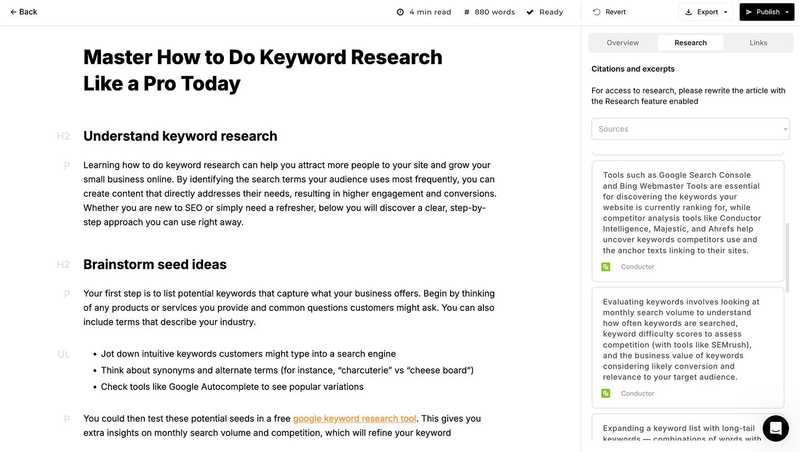
Machined specializes in content cluster creation in order to build topical authority around your topic or niche. Rather than create single articles, identify all keywords surrounding a topic and create a cluster of interlinked, SEO-optimized content – up to 30 articles that target both head and long-tail keywords.
Key Features
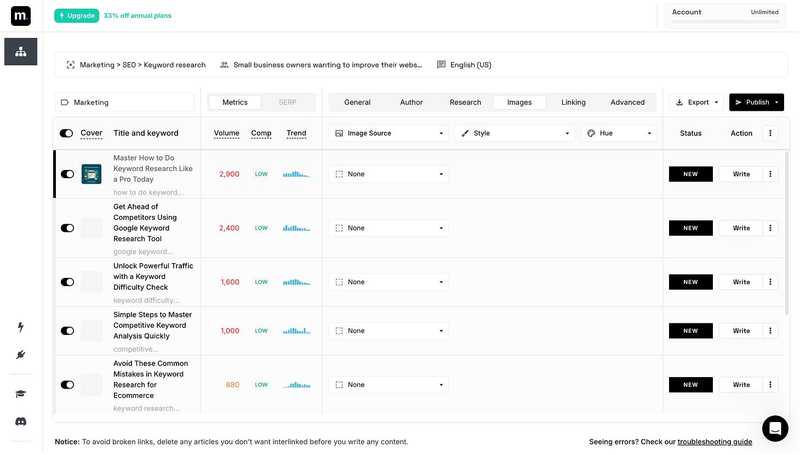
- Keyword research automation
- Clustering automation
- Internal linking
- Research and SERP analysis
- Direct CMS integrations
What Makes It Different
Most AI content tools work by creating single articles for a keyword of your choice. Machined is different in that you provide the topic, and Machined’s AI automation does the keyword research for you to find groups of keywords to write multiple articles about – covering the topic in depth to signal topical authority to search engines.
Machined’s automations also extend to the research, writing, interlinking, and publishing of content. This ensures that each cluster of content is factual, up-to-date, internally linked and can be published to your website directly from the app.
Pros
- Optimized human-like content quality
- Automations that save time
- Good research function
- Many settings to add extra instructions for the AI
- Affordable pricing due to BYOK (bring-your-own-key)
Cons
- Needs OpenAI API to be set up to work
- Focuses only on content creation, not on monitoring or optimizing existing content
- SEO focus only, no additional marketing copy
Best For
Small business owners, SaaS founders, niche website owners.
6. Wordwriter.co
Best for: AI writing for long-form content, research-heavy publishing, and multimedia repurposing
Website: https://www.wordwriter.co
Pricing: Free trial available · Paid plans from $19/month
Overview
WordWriter is an AI-powered writing platform built for professionals who need more than a blog post generator.
While most tools on this list handle short-to-medium content like emails, landing pages, and social copy, WordWriter is engineered for scale think complete book manuscripts, 200+ page research reports with citations, and full content pipelines that start with a video or audio file and end with a published article.
What sets it apart from the rest of the field is its combination of a proprietary AI research engine, long-form generation capabilities, and built-in SEO and GEO optimization all in a single platform.
For researchers, authors, and content-heavy marketing teams, this depth is difficult to find elsewhere.
Key Features
- Long-Form & Book Writing: Generate complete book manuscripts, mini-books, and research reports up to 1,000+ pages, with citations drawn from peer-reviewed journals, government reports, and recognized academic sources
- AI Research Agent: Automatically gather, analyze, and synthesize information for content creation, reducing manual research time significantly
- SEO + GEO Optimization: Built-in tools to optimize content for traditional search rankings as well as Generative Engine Optimization, improving visibility in AI-generated answers across platforms
- Multimedia-to-Content Pipeline: Upload audio or video, and WordWriter transcribes and transforms it into blog posts, newsletters, research notes, or social media content
- AI Image Generation: Generate on-brand visuals using voice commands or text prompts, without needing a separate design tool
- 100+ Templates: Cover blog posts, product descriptions, ad copy, landing pages, YouTube descriptions, business bios, and more
- Speech-to-Text: Capture spoken ideas in real time and convert them directly into written drafts
- WordPress Integration: Draft, schedule, and publish content directly to your WordPress site
- Team Collaboration: Real-time project sharing via Teams Folder
- Multi-Language Support: Create and translate content across multiple languages for global audiences
What Makes It Different
Most AI writing tools stop at content generation. WordWriter.co is built for the full publishing workflow from deep research and long-form drafting to SEO/GEO optimization, visual creation, and direct WordPress publishing.
Its standout capability is the combination of a dedicated AI research engine (with verifiable, scholarly citations) and a multimedia repurposing pipeline, making it particularly powerful for content teams that produce high-volume, research-backed material.
Very few tools on this list can take a recorded podcast episode and turn it into a fully cited research article in one platform.
Pros
- One of the few AI writing tools with built-in long-form and book-length generation
- Combines research, writing, SEO/GEO, image creation, and publishing in one workflow
- Multimedia-to-content pipeline handles video and audio repurposing natively
- Citations drawn from credible, verifiable academic and institutional sources
- Free trial available before committing to a paid plan
Cons
- Advanced features (long-form reports, book generation) consume significantly more credits
- Newer platform - some features are still actively being developed
- Depth of features can create a learning curve for first-time users
- Pricing will increase as introductory rates expire
Best For
Researchers, authors, and content marketing teams that regularly produce long-form, research-backed content and want a single platform to handle everything from source gathering and drafting to SEO optimization and publishing
7. Frase

Best for: Search-focused writing, research, and optimization in one workflow Website: https://www.frase.io Pricing: Paid plans available
Overview
Frase has grown into a more complete search-focused content platform than many marketers realize. It combines AI-assisted drafting with research, optimization, publishing support, site-level features, and AI visibility tracking, making it appealing for teams that want a more connected workflow.
It is especially useful for marketers who want to bridge content creation and discoverability rather than manage multiple disconnected tools.
Key Features
- AI-assisted drafting
- Research and content brief tools
- Optimization workflows
- Publishing support
- AI visibility and discoverability support
What Makes It Different
Frase blends writing, research, and search visibility more tightly than many standard AI writers. It is built for teams that care about performance, not just output speed.
Pros
- Connected content workflow
- Strong for research-backed writing
- Good mix of writing and optimization
- Useful for SEO-led teams
- More strategic than template-heavy tools
Cons
- Not the strongest pure writer on style alone
- Better for SEO teams than casual users
- Requires process to get full value
- Paid plans can add up
Best For
SEO-led content teams, in-house marketers, agencies, and publishers who want one platform to support multiple stages of the workflow.
8. Clearscope

Best for: Premium content optimization and discoverability Website: https://www.clearscope.io Pricing: Premium paid plans
Overview
Clearscope is best understood as a premium content optimization platform rather than a pure AI writing tool. It is especially useful for teams that already have writers and editors in place, but need stronger systems for topic coverage, refreshes, quality control, and content discoverability.
In 2026, its positioning around both traditional SEO and AI search visibility makes it more relevant than ever.
Key Features
- Content optimization reports
- Topic coverage guidance
- Refresh and update workflows
- Quality control for editorial teams
- AI search discoverability support
What Makes It Different
Clearscope is built for precision and process. It is less about fast generation and more about helping teams produce better-structured, better-covered, higher-confidence content.
Pros
- Strong optimization workflows
- Premium quality-control support
- Useful for refresh strategies
- Good for established teams
- Valuable where content mistakes are expensive
Cons
- Expensive for smaller teams
- Not a writing-first platform
- Better with existing writers than as a standalone solution
- Overkill for casual creators
Best For
Established content teams, agencies with demanding clients, publishers, and brands that care about both SEO and AI search discoverability.
9. Jasper

Best for: Brand-governed marketing content workflows Website: https://www.jasper.ai Pricing: Paid plans available
Overview
Jasper has evolved from a template-driven copywriting tool into a platform focused more on marketing operations, brand governance, and team-wide consistency. It is most useful when multiple stakeholders need to produce content across channels while staying inside approved brand rules.
That makes Jasper more appealing to organizations than to solo creators.
Key Features
- Brand voice and tone controls
- Team workflows and collaboration
- Campaign-oriented content support
- Repeatable templates and processes
- Approval and governance support
What Makes It Different
Jasper’s main value is not superior prose. It is workflow consistency at scale.
Pros
- Strong brand governance
- Good for larger teams
- Useful for campaign-based workflows
- Supports repeatable content operations
- Collaboration-friendly
Cons
- Harder to justify for solo users
- Premium cost
- Less compelling if you only need blog drafting
- General-purpose tools may write just as well
Best For
Larger marketing teams, agencies, and organizations that need brand-safe content workflows at scale.
10. Hypotenuse AI

Best for: Ecommerce content and large product catalogs Website: https://www.hypotenuse.ai Pricing: Paid plans available
Overview
Hypotenuse AI is one of the strongest specialized writing tools for ecommerce. It is built to handle product descriptions, collection pages, structured product content, and catalog workflows at scale.
For ecommerce brands, the challenge is rarely writing one great product description. The real problem is generating accurate, brand-aligned, scalable content across hundreds or thousands of products. Hypotenuse is designed for exactly that.
Key Features
- Product description generation
- Catalog content workflows
- Attribute enrichment
- Collection and category page support
- SEO-aware ecommerce copy generation
What Makes It Different
Hypotenuse is purpose-built for ecommerce scale. It is more practical than general chat-based tools when product data and catalog consistency matter.
Pros
- Excellent for large catalogs
- Built for ecommerce workflows
- Supports structured content generation
- Good for SEO-aware product content
- Helps scale without losing all control
Cons
- Less useful outside ecommerce
- Specialized use case
- Paid platform
- Still needs review for accuracy and differentiation
Best For
Ecommerce brands, retailers, and marketplaces that need scalable product and catalog content.
11. Sudowrite

Best for: Fiction and creative writing Website: https://www.sudowrite.com Pricing: Paid plans available
Overview
Sudowrite is one of the clearest examples of a specialized AI writing tool doing something genuinely different. Instead of targeting marketers, it is built for storytellers. Its interface and prompts are designed around novels, short stories, scenes, character development, and creative flow.
That makes it much more useful for fiction writers than a generic AI assistant.
Key Features
- Scene expansion
- Character and story exploration
- Brainstorming for narrative writing
- Help with creative blocks
- Story-focused workflow support
What Makes It Different
Sudowrite is built around storytelling rather than business writing. That focus makes it much more relevant for fiction than general-purpose AI tools.
Pros
- Specialized for creative writing
- Useful for overcoming writer’s block
- Good for character and scene development
- Better aligned with narrative workflows
- More helpful than generic tools for fiction
Cons
- Not meant for SEO or marketing content
- Limited value outside storytelling
- Paid platform
- Still requires authorial control
Best For
Novelists, screenwriters, and creative writers who want AI support without a marketing-first workflow.
12. Grammarly

Best for: Everyday editing, clarity, and polish Website: https://www.grammarly.com Pricing: Free plan available · Paid plans available
Overview
Grammarly remains one of the most useful editing layers in an AI writing stack. It is not the best choice for original drafting, but it is excellent for catching errors, improving clarity, tightening phrasing, and making content more presentable before publishing.
Its ease of use and integrations keep it relevant for almost anyone who writes regularly.
Key Features
- Grammar and spelling correction
- Clarity and tone suggestions
- Sentence tightening and cleanup
- Broad integrations
- Fast editing support
What Makes It Different
Grammarly is easy to keep in the workflow because it focuses on lightweight editing that improves day-to-day writing with very little friction.
Pros
- Fast and easy to use
- Great final-pass editing layer
- Useful across many writing contexts
- Strong integrations
- Free version available
Cons
- Not a deep writing platform
- Less useful for original long-form drafting
- Some suggestions can flatten style
- Better for polishing than content strategy
Best For
Anyone who writes regularly and wants fast, practical editing support.
13. ProWritingAid

Best for: Deep editing feedback for long-form writers Website: https://prowritingaid.com Pricing: Paid plans available
Overview
ProWritingAid remains a strong alternative for writers who want more detailed editing feedback than Grammarly usually provides. It feels more like a writing coach than a lightweight correction tool, which makes it especially appealing for book authors and long-form writers.
Key Features
- Style analysis
- Revision-focused editing feedback
- Long-form manuscript support
- Readability and structure assistance
- Deeper writing diagnostics
What Makes It Different
ProWritingAid goes beyond surface-level correction and offers more analytical feedback for revision-heavy writing.
Pros
- Strong for deeper editing
- Useful for long-form projects
- Better analytical feedback than lightweight editors
- Good for authors
- Supports revision workflows
Cons
- Less convenient for fast everyday editing
- More useful for long-form than short-form copy
- Can feel heavy for casual users
- Paid plans required for full value
Best For
Authors, editors, and long-form writers who want a more analytical editing experience.
14. Rytr

Best for: Affordable short-form writing and basic templates Website: https://rytr.me Pricing: Free plan available · Low-cost paid plans
Overview
Rytr remains relevant because it is simple and affordable. For users who want quick templates, basic generation, and a low monthly cost, it can still be useful, especially for short-form content and lightweight tasks.
Key Features
- Template-based content generation
- Short-form copy support
- Idea generation
- Simple interface
- Budget-friendly pricing
What Makes It Different
Rytr focuses on low-friction, low-cost writing help rather than complex workflows or premium features.
Pros
- Affordable
- Beginner-friendly
- Fast for short-form tasks
- Free plan available
- Easy to use
Cons
- Harder to justify as a primary writing tool now
- Less powerful than leading general-purpose tools
- Limited strategic value
- Better for simple tasks than serious content creation
Best For
Beginners, side projects, and users who want a low-cost entry point into AI writing.
15. Copy.ai

Best for: Go-to-market workflows and marketing automation Website: https://www.copy.ai Pricing: Free plan available · Paid plans available
Overview
Copy.ai has shifted from being seen mainly as a copy generation tool to more of a go-to-market and workflow platform. That changes who it is best for. It is less compelling as a pure article writing tool, but more useful for teams that want AI inside broader sales and marketing processes.
Key Features
- Marketing and sales workflow support
- Campaign-oriented content generation
- Structured AI workflows
- Automation support
- Team use cases beyond pure writing
What Makes It Different
Copy.ai is more about process-oriented marketing automation than deep long-form editorial writing.
Pros
- Good for GTM teams
- Useful for structured marketing workflows
- More process-oriented than many AI writers
- Free entry option
- Supports team use cases
Cons
- Not the strongest long-form writer
- Less useful for solo bloggers
- General-purpose models may be better for flexible drafting
- Strongest value depends on workflow needs
Best For
Sales and marketing teams that want AI support for go-to-market execution more than writing-first depth.
16. Gemini

Best for: AI writing inside Google’s ecosystem Website: https://gemini.google.com Pricing: Free plan available · Paid plans available
Overview
Gemini remains relevant because it fits naturally into Google’s broader ecosystem. For users already working heavily in Google Workspace, that integration can make it appealing for drafting, brainstorming, summarization, and productivity tasks.
Key Features
- Drafting and summarization
- Google ecosystem integration
- Productivity support
- Brainstorming assistance
- Embedded workflow convenience
What Makes It Different
Gemini’s biggest advantage is not necessarily writing quality. It is ecosystem fit.
Pros
- Useful for Google Workspace users
- Good for productivity tasks
- Easy ecosystem alignment
- Free option available
- Convenient for embedded use
Cons
- Many users still prefer ChatGPT or Claude for writing
- Less differentiated on pure output quality
- Strongest value depends on Google workflow usage
- Not an SEO-first platform
Best For
Users already working deeply inside Google tools who want AI assistance built into that environment.
17. Writer

Best for: Enterprise governance and brand control Website: https://writer.com Pricing: Enterprise paid plans
Overview
Writer is aimed more at enterprise content operations than casual creation. Its main strength is governance: brand control, style enforcement, compliance, and organizational consistency. That makes it less exciting for individuals, but much more relevant for large businesses.
Key Features
- Brand governance
- Style guide enforcement
- Enterprise workflows
- Compliance-oriented support
- Team-wide content consistency
What Makes It Different
Writer focuses on control and risk management more than creative flexibility.
Pros
- Strong governance features
- Good for large organizations
- Useful where compliance matters
- Supports team consistency
- Enterprise-oriented workflows
Cons
- Not ideal for solo users
- Enterprise focus limits appeal
- Less flexible for casual writing
- Typically expensive
Best For
Enterprises that need stricter control over how AI-generated content is created and reviewed.
18. Anyword

Best for: Performance marketing and conversion-focused copy Website: https://www.anyword.com Pricing: Paid plans available
Overview
Anyword remains most relevant for teams focused on performance-oriented marketing copy. Its value is less about long-form editorial writing and more about messaging tied to conversion, testing, and variation across channels.
Key Features
- Marketing copy generation
- Message variation
- Conversion-focused workflows
- Ad and landing page support
- Performance-oriented content use cases
What Makes It Different
Anyword is tuned more for performance marketers than for bloggers or editorial teams.
Pros
- Strong for ad and landing page copy
- Useful for conversion-focused teams
- Good for testing multiple messaging angles
- More focused than broad writing tools
- Helpful for paid channels
Cons
- Less compelling for long-form content
- Narrower use case
- Not built for editorial depth
- Paid platform
Best For
Performance marketing teams, advertisers, and brands focused on conversion-oriented copy.
19. Writesonic

Best for: All-in-one AI writing with bundled marketing features Website: https://writesonic.com Pricing: Free plan available · Paid plans available
Overview
Writesonic sits in the large middle category of AI tools that try to do many things at once. It can be useful for drafting, short-form content, and some SEO-adjacent tasks, but it competes in a crowded market where stronger general-purpose tools already set a high standard.
Key Features
- Blog and marketing content generation
- Short-form copy support
- SEO-adjacent tools
- Template-based workflows
- Multi-purpose writing support
What Makes It Different
Writesonic appeals to users who want a bundled writing platform rather than a pure chat-based experience.
Pros
- Broad feature set
- Useful for mixed content needs
- Free entry option
- Covers multiple writing formats
- More structured than pure chat tools
Cons
- Crowded category
- Hard to stand out against stronger general-purpose tools
- Not best-in-class in one specific area
- Value depends on interface preference
Best For
Users who want an all-in-one writing platform and prefer a more bundled feature set.
20. Wordtune

Best for: Rewriting and sentence-level improvement Website: https://www.wordtune.com Pricing: Free plan available · Paid plans available
Overview
Wordtune is more focused on rewriting than generation. That makes it useful for improving existing text, shifting tone, simplifying awkward phrasing, and making content clearer and more concise.
Key Features
- Sentence rewriting
- Tone adjustments
- Clarity improvements
- Concision support
- Editing-first workflow
What Makes It Different
Wordtune is best used as a refinement layer rather than a full drafting engine.
Pros
- Strong sentence-level rewriting
- Helpful for improving existing drafts
- Easy to use
- Good clarity-focused tool
- Free plan available
Cons
- Not a full writing platform
- Limited for long-form creation from scratch
- Better as a support tool than a main system
- Less strategic than bigger platforms
Best For
Professionals and writers who want better sentence-level rewriting and tone refinement.
21. Notion AI

Best for: Writing support inside content planning and documentation workflows Website: https://www.notion.so/product/ai Pricing: Paid add-on or included plans depending on plan structure
Overview
Notion AI is most valuable because it lives inside a workspace many teams already use. It helps with brainstorming, summarization, outlining, rewriting, and documentation without forcing users to leave their planning environment.
Key Features
- Embedded brainstorming and rewriting
- Summaries and note cleanup
- Content planning support
- Internal documentation assistance
- Workflow convenience inside Notion
What Makes It Different
Its biggest strength is convenience. You can manage ideas and writing in one place.
Pros
- Great for teams already using Notion
- Good for planning and rough drafts
- Convenient embedded workflow
- Useful for internal content operations
- Reduces context switching
Cons
- Not the strongest standalone writer
- Better for workflow support than polished drafting
- Less specialized than dedicated writing tools
- Value depends on existing Notion usage
Best For
Teams already managing content operations, notes, and planning inside Notion.
22. QuillBot

Best for: Paraphrasing and rewriting assistance Website: https://quillbot.com Pricing: Free plan available · Paid plans available
Overview
QuillBot remains more of a rewriting and paraphrasing tool than a complete writing platform. It can be useful for rewording sentences, simplifying phrasing, and cleaning up existing drafts, but it is not usually the best primary tool for serious content creation.
Key Features
- Paraphrasing
- Sentence rewriting
- Draft cleanup
- Tone and phrasing adjustments
- Lightweight writing support
What Makes It Different
QuillBot is focused on reworking text, not building a full writing workflow.
Pros
- Good for paraphrasing
- Easy to use
- Helpful for cleanup and variation
- Free option available
- Useful support layer
Cons
- Not a complete writing platform
- Limited strategic value
- Better for editing than drafting
- Can encourage shallow rewriting if overused
Best For
Users who want rewriting assistance rather than end-to-end content creation.
23. Descript

Best for: Turning audio and video into written content Website: https://www.descript.com Pricing: Free plan available · Paid plans available
Overview
Descript deserves a place here because modern writing workflows increasingly begin with spoken content. For creators repurposing podcasts, interviews, webinars, and videos into articles, summaries, social posts, and email copy, Descript can be extremely useful.
Key Features
- Audio and video transcription
- Content repurposing support
- Editable transcript workflows
- Multimedia-to-text transformation
- Useful for creator content pipelines
What Makes It Different
Descript is not just about writing from scratch. It helps turn spoken material into editable written assets.
Pros
- Great for repurposing multimedia content
- Useful for creator workflows
- Supports text-based editing of spoken content
- Good for interviews and podcasts
- Free entry option
Cons
- Not a traditional AI writing platform
- More useful for repurposing than original drafting
- Strongest value depends on multimedia workflow
- Less relevant for pure text-first users
Best For
Multimedia creators, marketers, and teams turning audio or video into written content.
24. Frase AI Article Writer

Best for: Faster article generation inside a search-focused platform Website: https://www.frase.io Pricing: Paid plans available
Overview
Frase’s article writer deserves separate mention because some teams want faster article generation without rebuilding their workflow every time. It is useful when you want search-backed article creation inside a platform already built around SEO and optimization.
Key Features
- Search-backed article generation
- Faster draft creation
- Integrated with Frase workflows
- Useful for content teams with repeatable processes
- Supports brief-to-draft workflows
What Makes It Different
Unlike generic article generators, it sits inside a broader SEO-focused workflow.
Pros
- Faster article creation
- More search-aware than generic generators
- Useful for teams already using Frase
- Supports structured workflows
- Better context than standalone drafting tools
Cons
- Best value is inside the full Frase ecosystem
- Less compelling as an isolated feature
- Output still needs editing
- Paid platform
Best For
Marketers and SEO teams who want faster search-backed article creation.
25. Grammarly Authorship and AI Features

Best for: Editorial transparency and AI-assisted review support Website: https://www.grammarly.com Pricing: Paid plans available
Overview
As AI-assisted writing becomes normal, attribution and transparency matter more. Grammarly’s broader authorship and AI-related features are increasingly relevant for teams that want better visibility into how content was created and refined.
Key Features
- Authorship insights
- Workflow transparency
- AI-related editorial support
- Revision visibility
- Team review assistance
What Makes It Different
It adds a layer of oversight rather than just generation or editing.
Pros
- Useful for editorial transparency
- Supports team review workflows
- Helps clarify content creation process
- Valuable in collaborative settings
- Extends Grammarly beyond correction
Cons
- Not a primary writing tool
- More useful for teams than individuals
- Best as a review layer
- Value depends on editorial process
Best For
Teams that value attribution, workflow transparency, and review support in AI-assisted content environments.
26. HyperWrite

Best for: Personal productivity and assistant-style writing help Website: https://www.hyperwriteai.com Pricing: Free plan available · Paid plans available
Overview
HyperWrite is useful for users who want an assistant-like writing environment that helps them move faster through everyday tasks. It is often more about productivity convenience than deep content strategy.
Key Features
- Assistant-style writing help
- Everyday drafting support
- Productivity-oriented workflows
- Quick content generation
- Lightweight task support
What Makes It Different
HyperWrite focuses on helping users move faster in day-to-day writing situations rather than building a full editorial system.
Pros
- Helpful for everyday tasks
- Fast and lightweight
- Useful for productivity-focused users
- Free option available
- Easy support tool
Cons
- Less strategic than top writing tools
- Not built for advanced SEO workflows
- Limited differentiation for serious content teams
- Better for convenience than depth
Best For
Users who want assistant-style support for everyday writing and productivity.
27. Perplexity for Writing Research

Best for: Research-heavy writing and content planning Website: https://www.perplexity.ai Pricing: Free plan available · Paid plans available
Overview
Perplexity is not a traditional AI writing tool, but it can be incredibly useful in a writing workflow because research quality often determines content quality. For marketers, editors, and SEO professionals, it can help build better briefs, sharper outlines, and more informed drafts.
Key Features
- Research support
- Faster fact gathering
- Useful for brief creation
- Better source discovery
- Strong input for content planning
What Makes It Different
Perplexity is more valuable as a research engine than as a drafting engine.
Pros
- Excellent for research-heavy workflows
- Useful for briefs and outlines
- Helps improve content inputs
- Free option available
- Good complement to drafting tools
Cons
- Not a traditional writing platform
- Best paired with another writer
- Research still needs verification
- Less useful for direct content generation alone
Best For
Writers, editors, and SEO teams who want better research inputs before drafting content.
28. Canva Magic Write

Best for: Design-led content and social copy inside Canva Website: https://www.canva.com Pricing: Free plan available · Paid plans available
Overview
Canva Magic Write is not a top-tier long-form writing platform, but it is useful for creators who already work inside Canva and want quick text support for presentations, social posts, ads, captions, and visual assets.
Key Features
- Quick text generation inside Canva
- Social copy support
- Presentation writing assistance
- Visual-content workflow alignment
- Simple drafting help for design-led teams
What Makes It Different
Its value comes from being embedded directly in a visual content environment.
Pros
- Convenient for Canva users
- Good for social and design copy
- Useful for fast visual-content workflows
- Free option available
- Easy to use
Cons
- Not a serious long-form writing tool
- Limited for editorial workflows
- Better for light support than deep content creation
- Strongest value depends on Canva usage
Best For
Social teams, designers, and creators already building visual content in Canva.
29. Microsoft Copilot

Best for: Writing support inside Microsoft 365 workflows Website: https://copilot.microsoft.com Pricing: Paid plans available
Overview
Microsoft Copilot matters mainly because of where it fits. For businesses that already operate heavily inside Microsoft 365, it can support drafting, summarizing, rewriting, and internal communication inside the tools teams use every day.
Key Features
- Drafting and summarization
- Microsoft ecosystem integration
- Support inside everyday productivity tools
- Internal communication assistance
- Workflow convenience for businesses
What Makes It Different
Its main advantage is not that it is the strongest standalone writer. It is that it lives where many enterprise teams already work.
Pros
- Strong ecosystem fit for Microsoft users
- Useful for productivity and internal writing
- Good for business workflows
- Helpful embedded support
- Relevant for enterprise environments
Cons
- Less compelling outside Microsoft-heavy organizations
- Not the strongest pure writing experience
- Value depends on ecosystem usage
- Better for workflow support than writing depth
Best For
Businesses deeply invested in the Microsoft ecosystem that want AI support inside existing workflows.
30. Originality.ai

Best for: Quality control and AI-content review workflows Website: https://originality.ai Pricing: Paid plans available
Overview
Originality.ai is not an AI writing tool in the normal sense, but it still belongs in the wider conversation because many publishers, agencies, and editorial teams want review layers for AI-assisted output. It is better understood as a quality-control and policy tool than a drafting platform.
Key Features
- AI-content review support
- Quality-control workflows
- Editorial policy checks
- Publishing oversight support
- Useful as a review layer
What Makes It Different
It is designed for checking and control rather than content creation.
Pros
- Useful for publishers and agencies
- Supports internal content review workflows
- Helps create oversight around AI-assisted publishing
- More of a policy tool than a drafting tool
- Relevant for editorial operations
Cons
- Not a writing platform
- Cannot replace editorial judgment
- Best as a supporting layer
- Less relevant for solo creators
Best For
Teams that want review processes and controls around AI-assisted publishing.
Final thoughts
The best AI writing tools in 2026 are not all trying to do the same job.
Some are best for drafting. Some are best for optimization. Some are best for editing. Some are best for scale. And some are best because they fit naturally into the systems teams already use.
The All-in-One Platform for Effective SEO
Behind every successful business is a strong SEO campaign. But with countless optimization tools and techniques out there to choose from, it can be hard to know where to start. Well, fear no more, cause I've got just the thing to help. Presenting the Ranktracker all-in-one platform for effective SEO
We have finally opened registration to Ranktracker absolutely free!
Create a free accountOr Sign in using your credentials
For most users, ChatGPT remains one of the strongest starting points because of its flexibility, speed, and range. Creaitor.ai earns a top spot because it adds something genuinely new to the category with built-in GEO, helping teams improve not only traditional search visibility but also visibility across AI-generated answers. Claude remains one of the best options for natural long-form writing, while tools like Surfer, Frase, and Clearscope add more value when optimization and discoverability matter.
For ecommerce, Hypotenuse stands out. For creative writing, Sudowrite still has a clear edge. For editing, Grammarly and ProWritingAid remain useful support layers rather than true replacements for strategic writing tools.
The best setup is rarely the most expensive one. It is the one that helps you move from research to publishable, useful content with the least friction and the most control.
For teams that care about rankings, AI visibility, and measurable growth, the real advantage comes from pairing AI writing tools with strong SEO data and performance tracking. That is where Ranktracker fits into the picture, helping marketers validate opportunities, monitor rankings, and turn content production into something measurable.
FAQs
What is the best AI writing tool in 2026?
For most users, ChatGPT is still one of the best all-round AI writing tools because it can support brainstorming, outlining, drafting, rewriting, and research-assisted writing in one place. For teams that also want AI-search visibility, Creaitor.ai stands out because it combines writing with built-in GEO.
What is the best AI writing tool for SEO?
For SEO, the best setup is usually not one tool alone. A practical stack often includes ChatGPT or Claude for drafting, Ranktracker for keyword and SERP data, and a platform like Surfer, Frase, or Clearscope for optimization. Creaitor.ai is also notable because it adds GEO tracking for AI-generated search environments.
Are paid AI writing tools worth it?
They can be, but usually only when they solve a real workflow problem such as optimization, governance, collaboration, AI visibility tracking, scale, or specialization. Many solo users can get started with free tools before moving to paid platforms.
Which AI writing tool is best for long-form blog posts?
Claude and ChatGPT are both strong choices for long-form blog writing. Claude is often preferred for more natural-sounding drafts, while ChatGPT is especially useful for planning, outlining, and adapting content to different formats.
Which tool is best for ecommerce content?
Hypotenuse is one of the strongest options for product descriptions, category pages, and large-scale ecommerce content workflows.
Which AI writing tool is best for fiction?
Sudowrite remains one of the strongest specialized tools for fiction and creative writing because it is built specifically for storytelling workflows.
Do AI writing tools help rankings on their own?
No. Rankings come from search demand, targeting, useful content, technical quality, and authority. AI can speed up content production and improve workflows, but it does not replace strategy, editorial judgment, or SEO execution.